I've long been fascinated by the notecard systems of people like Ryan Holiday and Billy Oppenheimer, and no less fascinated by the quality of content they consistently share.
My current system for collecting nuggets and wisdom I pick up in everyday life is a mess. I kind of use "likes" on twitter as a way to "remember" good bits, and I use Apple Notes for writing up ideas I get. On top I heavily use bookmarks, with a bit of Mymind mixed in. And then there's this blog, which also somehow acts as a note taking device.
This week I decided to give Zettelkasten a go. Because as much as I find it cool with the hand-written direction Ryan Holiday and Billy Oppenheimer take, I don't think that's for me. The leap is too big. And I feel like I can better express my thoughts with a keyboard in front of me than with pen and paper.
Either way, I really love the software made by the Zettelkasten crew called "The Archive".
Note Taking: Nimble, Calm, Plain.txt
I know there are many options out there. Many people seem to love Obsidian for instance. But for me, The Archive is much more appealing in its simplicity.
It kind of reminds me of 37Signals, and their philosophy to making products.
“Victory belongs to the most Tenacious” — a phrase that echoes across the clay courts of Paris each spring.
Originally attributed to Napoleon and later adopted by aviation hero Roland Garros, this quote now adorns the stadium walls of the French Open. And it couldn’t be more fitting.
Alternatively "Victory belongs to the most persevering".
French Open (Also often referred to as Roland Garros), is a Grand Slam tennis tournament (Highest level tournament). Winning a Grand Slam tournament truly is an act of perseverance.
Yet as much as I admire this quote and its connection to Roland Garros, it brings up a question that continues to bother me:Why don’t women compete in best-of-five sets, just like the men?
Part of what makes this quote so fitting — “Victory belongs to the most tenacious” — is the grueling nature of the men’s format. Winning a best-of-five match demands physical endurance, mental toughness, and, yes, perseverance. Shouldn’t that same stage be set for the women?
I can’t see a good reason why it shouldn’t.
In fact, I think something is being lost here—not just for the female athletes, but for the fans too. We’re missing out on longer battles, deeper momentum swings, and the kind of legendary comebacks that only extended formats allow. Imagine how many iconic moments never had the chance to unfold simply because the match ended too soon.
Equality isn’t just about prize money or airtime. It’s also about giving every player the same opportunity to prove their resilience.
Who am I to comment on all this?
Just a web designer from Norway—and a big tennis fan.
In fact, I've even built the web page for Casper Ruud via my small design studio, Vasser. Maybe one day he’ll lift that Roland Garros trophy himself.
Most years since my late teenage years I had the same simple new year’s resolution: Care less what others think of me.
I still work on that same goal a decade (or two) later, but have luckily gotten a bit better along the way. I have also found a different perspective to it: decreasing FOLD (Fear Of Looking Dumb).
If you have a question in mind, just ask. Doesn't matter if others think its stupid. Also just admit that you "don’t know" more often. Don’t pretend or put up an act just to fit in. Be true and honest.
Some will laugh. Some will judge. But the relationships you truly value over time will only strengthen. It's also just a more fun way to live life.
I notice that I act naturally like this with close friends, but it takes more time to get to this level with new acquaintances. But that's just on me to change.
As The Grug Brained Developer says: be strong! no FOLD!
What I really like about having a personal web page, is that it can be ground zero for testing out ideas. If something feels right, it'll likely carry over to other projects I work on.
Time to drop Tailwind?
This has been a thought I've been having a lot in mind recently.
Its mainly come from a combination of focus on simplifying web development, and having fun again with basic pure CSS.
Also, a big wish is the idea of skipping build steps. Tailwind is basically my only build step, and I sure like the idea of skipping it.
One topic that has come up often in my Tailwind projects lately is the lack of good options for fluid designs. It all feels very rigid on breakpoints. I've ended up using a lot of custom fluid text-sizes, but it doesn't exactly spark joy to config these things in Tailwind.
Thoughts on Cube CSS
I really enjoy the writing (and thoughts) of Andy Bell, and CUBE css has been on the radar ever since I heard about it back in 2020.
I really enjoy a lot of the foundational ideas, and basically the whole concept of "less is more", and letting the browser do more of the work, instead of stripping it all away as I've been doing with Tailwind projects the last couple of years.
So I thought I'd try – with this newfound focus on pure CSS – to remove Tailwind from this personal web page (I know, not really a massive layout challenge…). But just to get the feel back for writing CSS "the old way". (As an aside, I made my first webpages twenty years ago, so "the old way" shouldn't be that unfamiliar)
My main issue with pure CSS in 2023
The main problem I have with CSS right now, is the lack of good include / import options. Pure css @import is unfortunately bad for performance. How bad? I don't know. But I do know all audits will flag it as bad practice, so it kind of feels like a bad option.
I was never really into SCSS, SASS, LESS etc. Similarly to how Tailwind tries to "fix css", the preprocessors helps with a lot of things, but also adds complexity.
When I finally manage to remove my node modules and Tailwind, I don't want to add in SASS..
CSS without build steps is my goal. Of course I'm talking smaller projects, and not cnn.com.
What I decided to do
I've removed tailwind from this page now, and gone super simple one style.css file, and tried to take a few approaches like Andy Bell has suggested in CUBE css (very loosely).
Not very clean CSS this far, but still, it definitely felt fun again to write cleaner html and work with the cascade. CSS has really come so far the last years!
Oh, and even with the added prism css styles (compressed at 2kb), my uncompressed total css weight is at 9kB. The previous Tailwind css (minified and purged) was at 26kB.
Why not minify the style.css you say? It gives me 7kB instead of 9kB, but to be honest, I'm not gonna add any minifying step to shave off 2kBs.
This way the css is also perfectly readable for whoever feels like peeking – compared to the Tailwind compressed css. This perfectly aligns with DHH's idea on Paying tribute to the web with View Source. This is how I learned web development 20 years ago. I know, times have changed with GitHub, browser tools etc. But still I feel the "view source" is an underestimated learning tool.
I love it. No node modules. No build steps. A simple css file. More of a Greenfield project.
The last month I've been diving into sustainable web design, and although I keep links in apple notes, bookmarks etc. I kind of like the idea of using the blog for long-term storage.
nachhaltiges-webdesign.jetzt (Only available in German. nachhaltiges-webdesign.jetzt ist eine Sammlung von Methoden zur Gestaltung von nachhaltigen Websites.)
Branch Magazine Branch is an online magazine written by and for people who dream of a sustainable and just internet for all. (Added 4.11. Thanks Nicolas Paries!)
Some people in the Statamic community have commented that my previous tests were unfair (or rather; dumb and crap).
Some arguments pointed towards 1: file size doesn’t matter, and 2: Statamic had «no caching and file watcher was on».
I'm not out here to talk any system down, and only try to fairly make comparisons for my own sake. But in any case, lets dive into the arguments:
1: File size doesn’t matter?
This is not about technical advantages or disadvantages, and people might see this differently than me, but my perspective is like this:
While file size might seem irrelevant to privileged users (often us developers), sitting on fairly new hardware and unlimited fiber-speed internet, its easy to forget that this is not the case for the whole world.
As a simple example comparison of the Kirby install of 6mb vs Statamic at 86mb: At 1 million installs it’ll be 6TB vs 86TB. This will likely be downloaded on local machines, but also on a server. Lets say 2 places (12TB data transfer vs 172TB) Maybe you even have multiple environments and separate installs.
The way I see it, at scale, filesize most definitely matters.
2: How about caching?
Just to make that clear from the bat: None of the CMSs in my previous test used caching. It was all fair game on even terms.
But ok, an argument could be made that one would anyway be caching, so therefore the tests were not realistic.
Even though I don’t personally agree to this, and don’t believe the majority of sites use caching, I still got interested to see how it looks if every system uses caching.
Some notes before results
Wordpress was only tested uncached and cached with a plugin. https://www.boldgrid.com/w3-total-cache/. I didn’t find a "native" way to activate caching (without a plugin). Probably just me being dumb. Let me know if you know how!
The three states tested on all the other systems were 1. uncached, 2. cached with the native simple caching mechanism: Craft CMS with {% cache %} tags. Statamic with file watcher off and cache strategy "half". And in Kirby with simply activating cache in the config.php. 3. Full static caching with NGINX rewrites.
The "best case" caching serving static files (Statamic full cache, Craft CMS with Blitz, Kirby with Staticache and Wordpress with w3 total cache" are almost identical, and kind of useless data. All it does at this point is serve html-files without touching php, so they are just included to see the performance gains of that vs uncached and "simple" caching in each system.
All numbers have been averaged based on three tests runs.
I've done tests with OPcache activated and deactivated, apart from on the statically cached examples.
Results:
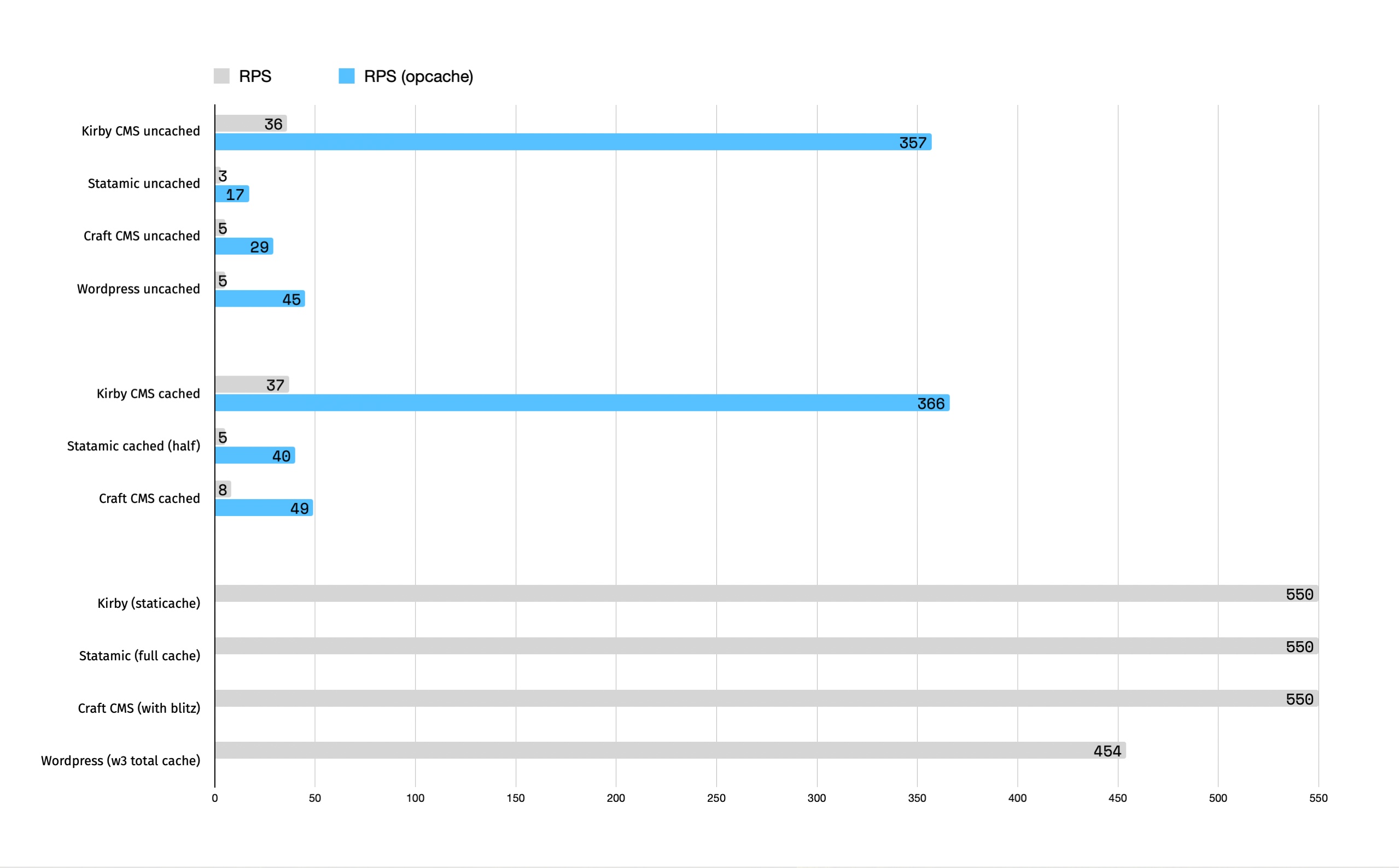
Response per second comparisons
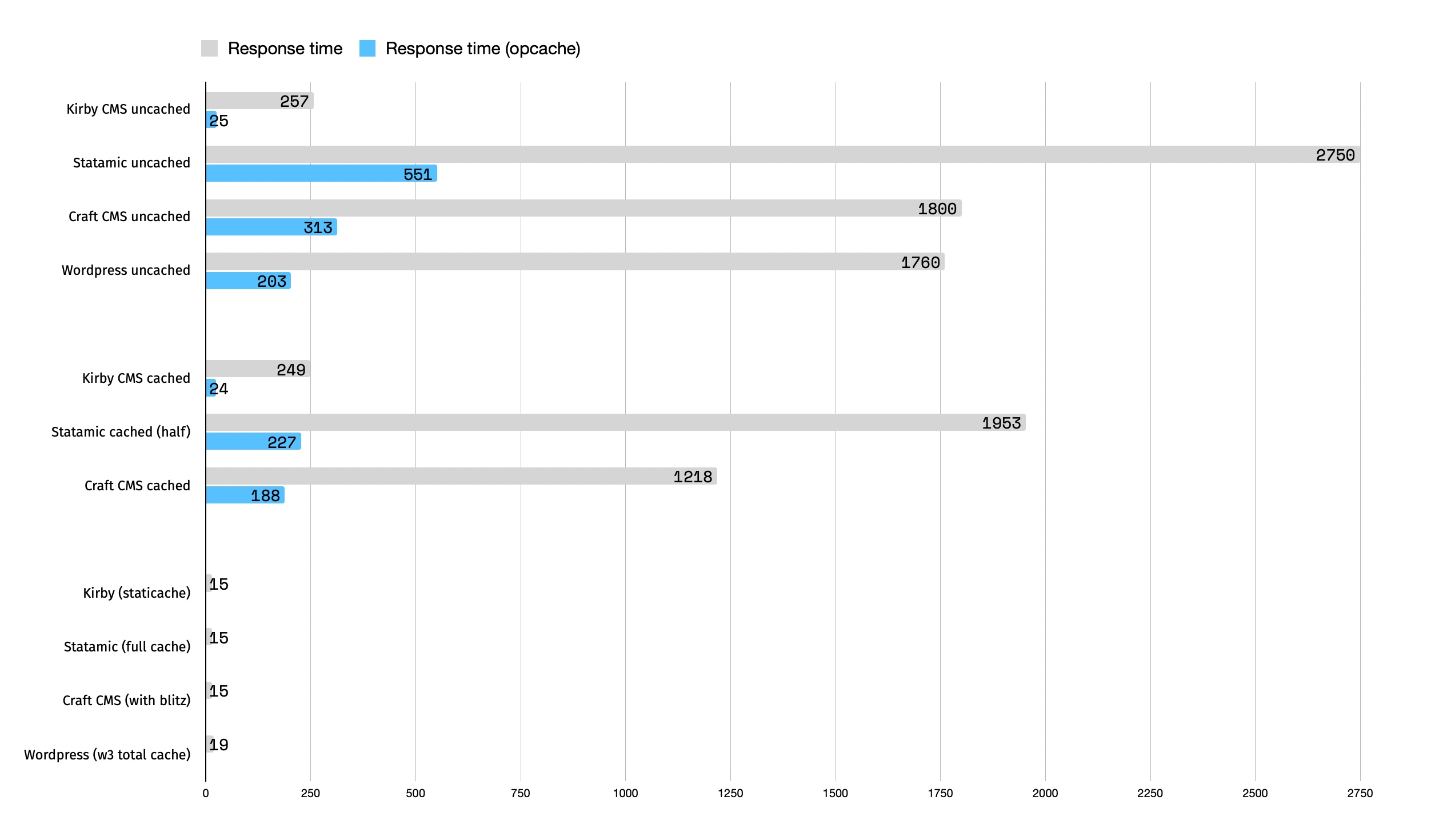
Response time comparisons
Takeaways:
OPCache makes a big difference.
Kirby cached and uncached are less different than other systems. But regardless, with OPcache turned on Kirby is getting even close to the statically cached sites. Pretty impressive.
Statamic uncached is quite bad.
Craft CMS would really benefit from merging Blitz to core, to be able to offer what Kirby and Statamic does without third party plugins.
Using Laravel Forge, performance was «as if» OPcache was active before actually activating it on the server. Turning it on and thereafter off substantially worsened the results. Is OPcache on by default even though it says it isn’t?
As always, feel free to reach out if you have feedback!
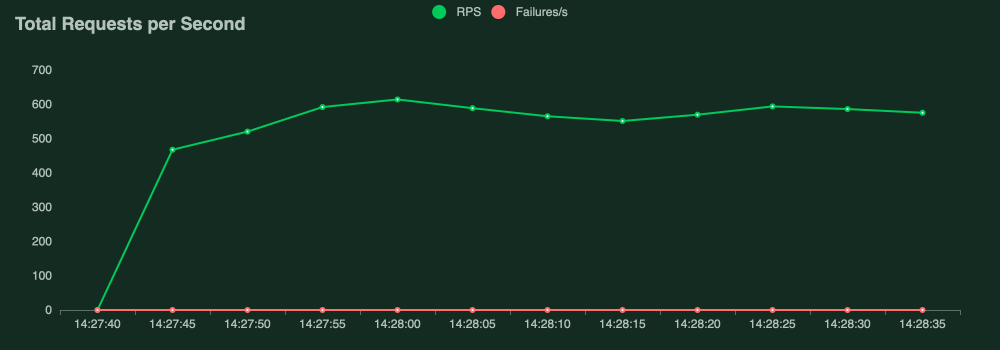
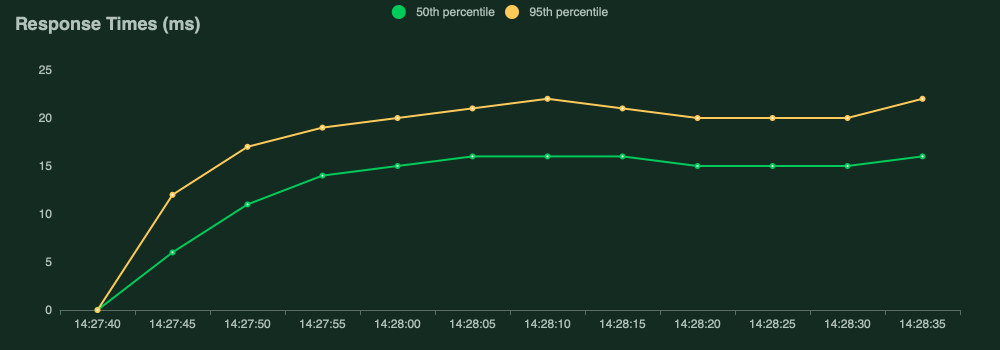
This is our control test. The baseline pure static html (with a css file and the images of course).
Unsurprisingly the static variant is the one with the best results. Lowest median response rate at 15ms, and a RPS of 537.6.
Requests per second
Response time
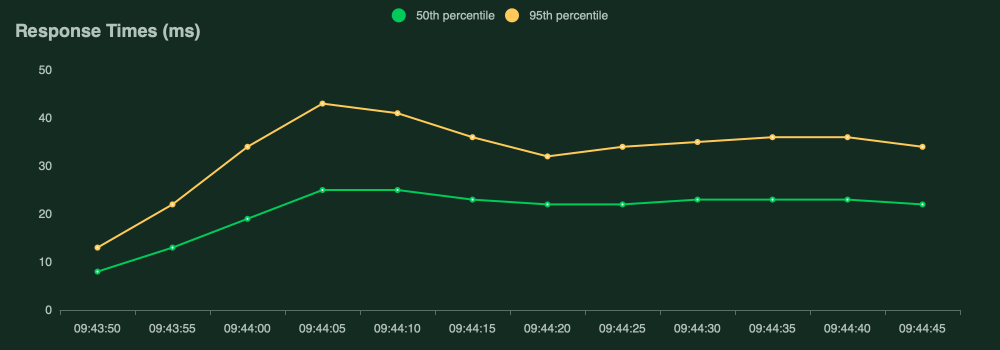
Kirby
Version 3.9.7
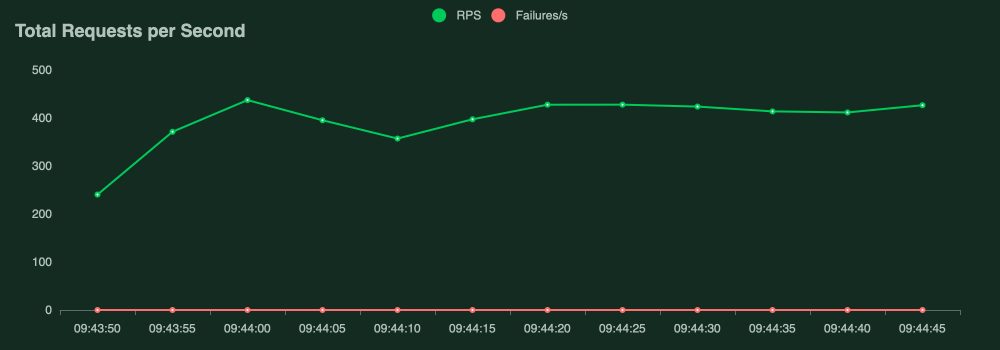
RPS (requests per second) of 426.9, and an average (median) response time of 22ms. By far the best result (again).
Requests per second
Response times
Craft CMS
Version 4.5.6.1
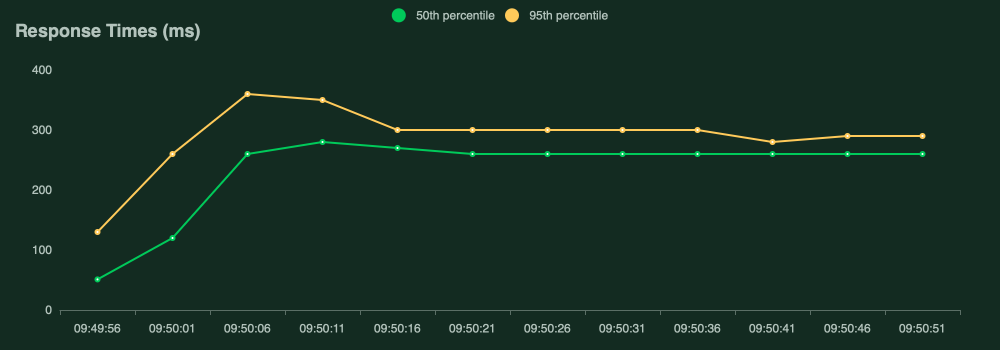
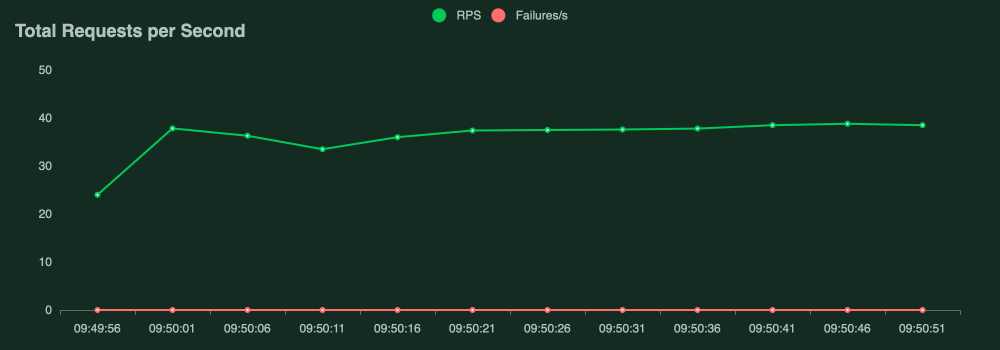
RPS of 37.4 and a median response time of 246ms.
Pretty much 10 times as few requests per second compared to Kirby, and more than ten times the average response time. Still substantially better than Statamic though.
Requests per second
Response time
Wordpress
Version 6.3.2
Using the featured image, title and the_content() for Lead Paragraph.
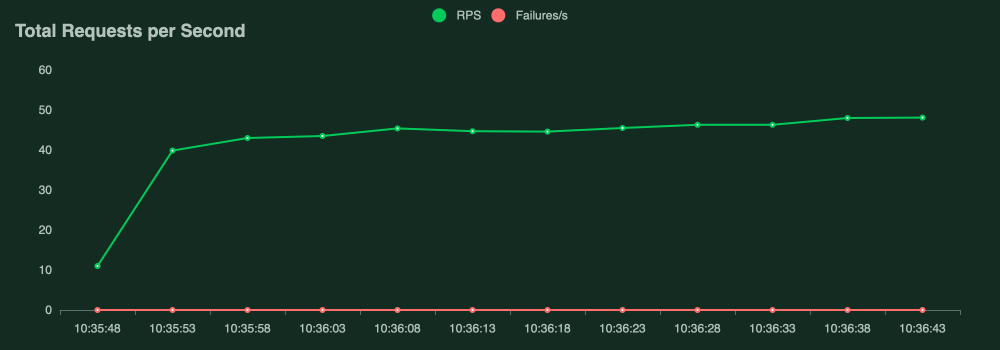
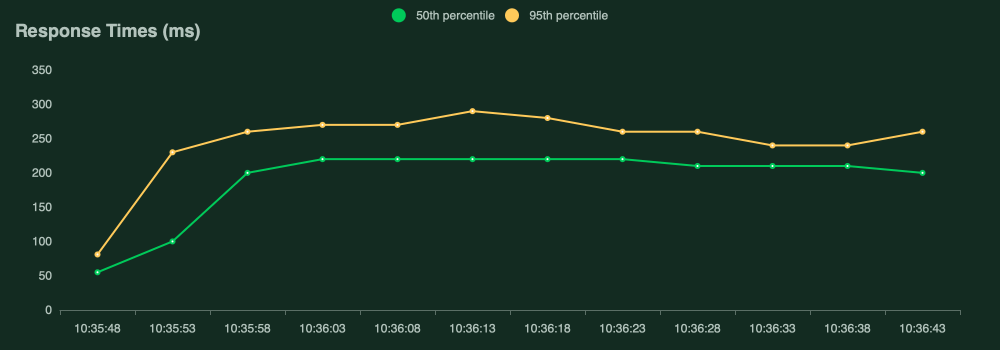
RPS of 45.7 and a median response time of 201ms.
Second after Kirby, but still, pretty much 10 times slower response times with almost ten times less requests per second.
Requests per second
Response time
Statamic
A blank install of version 4.27.0.
Again, title, lead paragraph and an asset field for the hero section from the cp panel. Otherwise static html.
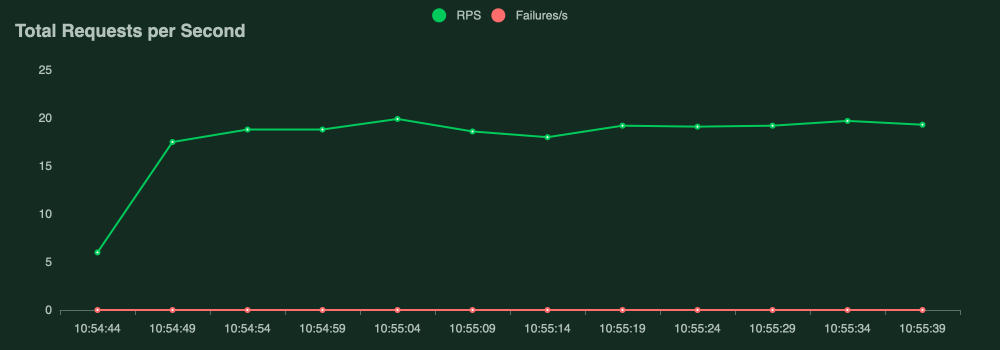
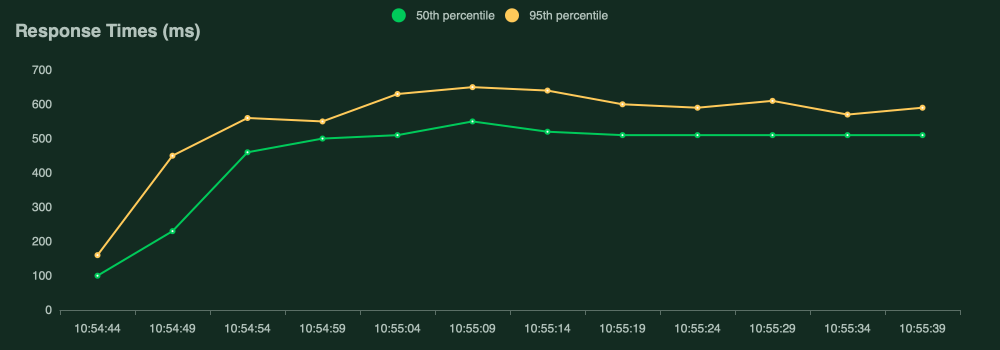
RPS of 19 and a median response time of 480ms
Requests per second
Response time
Why is it interesting?
Well, to me this is very interesting because it further cements my beliefs that a lighter code base causes less strain on the server, which again gives a leaner and quicker end result.
Of course the test is not perfect. If you do have insights and good ideas on how to further test this in more realistic ways, please reach out to me. I'm not trying to promote any particular system here, I'm just trying to get some basic facts on the table.
In those, he is testing Craft CMS cached vs uncached, and also using a static html as comparison. Highly recommended reading. He is much more qualified at this than me, but I tried my best to follow his lead in this very interesting path of performance testing.
I'm a big fan of Laravel Forge for provisioning servers.
Generally setting up a Kirby site is very straight forward, especially on Apache, but with default Forge setup (and Nginx) there are two small things that has tripped me up a few times already. That's why I make these notes for myself.
Disable Go helper function in Kirby
(because of a conflict with Swooles Go function)
# index.php

<?php

// Add in the line below
define('KIRBY_HELPER_GO', false);

require __DIR__ . '/kirby/bootstrap.php';

echo (new Kirby)->render();
Edit October 2024:
I've found a better way to do this is to disable the Swoole library in the php settings.
I add the following to the PHP FPM configuration:
swoole.use_shortname = Off
swoole.enable_library = Off
With this in place, I don't need to disable the helper function anymore in the index.php file.
Nginx config changes
On the site at hand, click the dropdown "edit files" and further "Edit Nginx configuration". Add the two following lines before the location
…

rewrite ^\/(content|site|kirby)/(.*)$ /error last;
rewrite ^\/\.(?!well-known\/) /error last;

// and it continues like normal…
location / {………
Wow, I really didn't expect to have any readers at this point, but after my CMS filesize comparison post I've had a few people asking me for my RSS feed, which is really cool!
I've also been digging further into Kirby CMS lately, and felt the personal web page was a perfect starting point. So now this page is up and running on Kirby CMS (Version 4 beta 2 at the moment of writing this). Pretty cool!
The process of migrating from Craft CMS was really smooth. Of course – I know – my web page is not exactly content dense, so the "migration" was not really a big task.
So, some might be wondering. Why change from a free Craft Solo site to a paid Kirby site? Good question.
I really like the minimal approach Kirby takes to its CMS, and it aligns better with my personal needs and taste. I also wanted to "put my money where my mouth is". It also just currently feels much more fun, which is not to be underestimated!
Still though, Craft CMS is a great system. It just feels more business and enterprise to me (and feels to be moving even more in that direction). As a personal private web page it's not really a good fit.
Oh, and yeah, a RSS feed is now added! Thanks for the feedback!
I often think about wether its purely nostalgia, or any reasonable thought behind my need to simplify web development. I find it has gotten unnecessarily complicated the last decade, and often not resulting in better experiences on the web.
That's why I really get pulled towards tools that embrace this "less is more" attitude. One examples being Kirby CMS – "Just files and folders. Kirby stores your content in simple text files. Folders are pages. Add images, documents and videos and you are ready to go. It’s that simple.". It was also what attracted me to Perch CMS back in the day: "The really little content management system".
Its also what I always enjoyed about Apple and in particular Steve Jobs and Jony Ive, and the influential Braun designer Dieter Rams. "Less is more".
I guess its a general principle moreso than a specific topic of website development. But it becomes clearer and clearer for me that the path forward (for me) is in decluttering and simplifying. Focus on the essentials, and do them well.