I mainly work with Craft CMS sites currently, and I made the switch from Laravel Valet to DDEV as per their suggestions last year.
Generally there is much to like about DDEV, especially the aspect of having different versions of PHP per project is a bit easier to maintain than it was in Laravel Valet, and to have this config directly in the project files.
But I sure do miss the simplicity that Valet had. Just drop a folder into the parked folder, and its instantly available at foldername.test in the browser.
Especially seeing my newfound fascination for the flat file CMS Kirby, I really miss being able to just drop the folder in the Valet directory and be up and running.
So, now I run both side by side. This is how I've done it:
I've made two separate coding folders: One for my DDEV projects (Craft CMS), and one for Valet; my new "lightweight" quick work directory.
To avoid port-issues I set up DDEV projects using a specific port:
This somehow still didn't allow me to ddev start my projects initially, because it still squirmed about port 433 being in use. So it was needed to do a ddev poweroff before the ddev start.
People probably disagree with the usefulness of a blunt size-comparison between CMS'es. But I find it a great indication of complexity vs simplicity, tendencies of bloat, load times ++.
I only really care about PHP CMSes, and my testing list goes like this:
As a fun little extra one I'll add Perch Runway, because I used that a lot back in the day, and always found its great advantage was its "lightness".
…and drumroll:
The winner: Kirby CMS. Weighing in at 6.1MB it is miles ahead of (most) competitors.
Runner up: Perch Runway. At 11.2MB it is almost double the size of Kirby, but still very light compared to the rest. Still, Perch is not actively maintained, and is not a good option for new projects in 2023. It is more included in this list because of my personal history using it.
Wordpress: A whooping 54.9MB without any theme code is almost 10 times the size of Kirby. And we all know how much plugin and theme code usually gets added.
Craft CMS: 70.8MB. My current go-to CMS. There is really a lot to love about Craft CMS, but the size of the codebase is not one of them.
Statamic: 86.3MB. Laravel sure is a great framework underneath, but it definitely comes at a cost. The /vendor folder excluding the /statamic folder is 67MB alone.
I don't know about you, but I really like to live by the principle "as little code as possible", or rather "as little complexity as possible". I feel this is as good of an indicator as many.
As an aside: Statamic and Kirby does not use databases. Craft, Wordpress and Perch will have the added size (and complexity) of databases added on top. Another win for Kirby if you ask me.
Kirby sure is looking like an interesting option going forward. 🤔
I saw this tweet the other day, and it resonated with me.
It hits me at the right moment, because I both try to convince myself that this blog has a reason to live, and at the same time try to convince myself to take my work less "seriously", and enjoy the process more.
I've been locked in a "never good enough" state all my life, and finally I think I'm old enough to let go of other peoples expectations and just roll with how things are.
share your work share your work share your work share your work share your work share your work share your work share your work share your work share your work share your work share your work share your work share your work share your work share your work share your work
I just finished a great little book from John Cleese called Creativity: A short and cheerful guide.
In it, he talked about a book and idea from Guy Claxton, called "Hare Brain, Tortoise Mind" (Which now is on my reading list).
The idea is that the "Hare Brain" involves 'figuring matters out, weighing up the pros and cons, constructing arguments and solving problems.' This is the classic problem-solving way of thinking relying on reason, logic and deliberate conscious thinking.
The most interesting part however, was the idea of the Tortoise Mind, and of its importance on creative work. The Tortoise Mind 'proceeds more slowly … It is often less purposeful and clear cut, more playful, leisurely or dreamy. In this mode we are ruminating or mulling things over, being contemplative or meditative. We may be pondering a problem, rather than earnestly trying to solve it'.
The crucial point being made is that this leisurely Tortoise Mind, for all its apparent aimlessness, is just as intelligent as the much faster 'Hare Brain'.
'When we are not sure what needs to be taken into account, or even which questions to pose – or when the issue is too subtle to be captured by the familiar categories of conscious thought … we need recourse to the tortoise mind.'
The neuroscientist Dr. Nancy Andreasen did a study of brain activity when the brain is in a "resting state"—free of inputs/free to wander: During REST, the brain "uses its most human & complex parts."
"We found activations in multiple regions of the association cortex," Dr. Andreasen wrote. "We were not [seeing] a passive silent brain during the ‘resting state,’ but rather a brain that was actively connecting thoughts and experiences.”
To me, building a Second Brain sounds too esoteric, but the core ideas of generally getting systems in place and organizing your digital life really appeals to me.
So now I have organized all my Apple Notes into the folders "Projects", "Areas", "Resources" and "Archives", and work on giving all kinds of information a clear home. Already two days in I feel it is working wonders. It both makes me want to write more (now that I know where to sort my thoughts), and also makes it way easier to find the information I look for.
Therefore I have finally started to take action now, and have done a full Takeout of my data at Google, and go through it piece by piece now, starting with my Photos and emails.
I do however not intend to go "cloudless" with my data. But I am making more intentional decisions this time around. So for Photos I add everything to iCloud. There are so many benefits to be able to have them easily available at my phone at all times, and it gives me great joy to look back at photos. I also share with my family often, and need a good solution for that.
I do have the plan to make a full backup-system of my photos on a yearly basis, and store that in a physical HD at least at one location.
As for email, I have already made the switch to Hey, and will continue that gradual change at all digital plattforms.
I heard Seth Godin say this on a podcast with Tim Ferriss:
"If you don’t have time to do it right, how will you find time to do it over?"
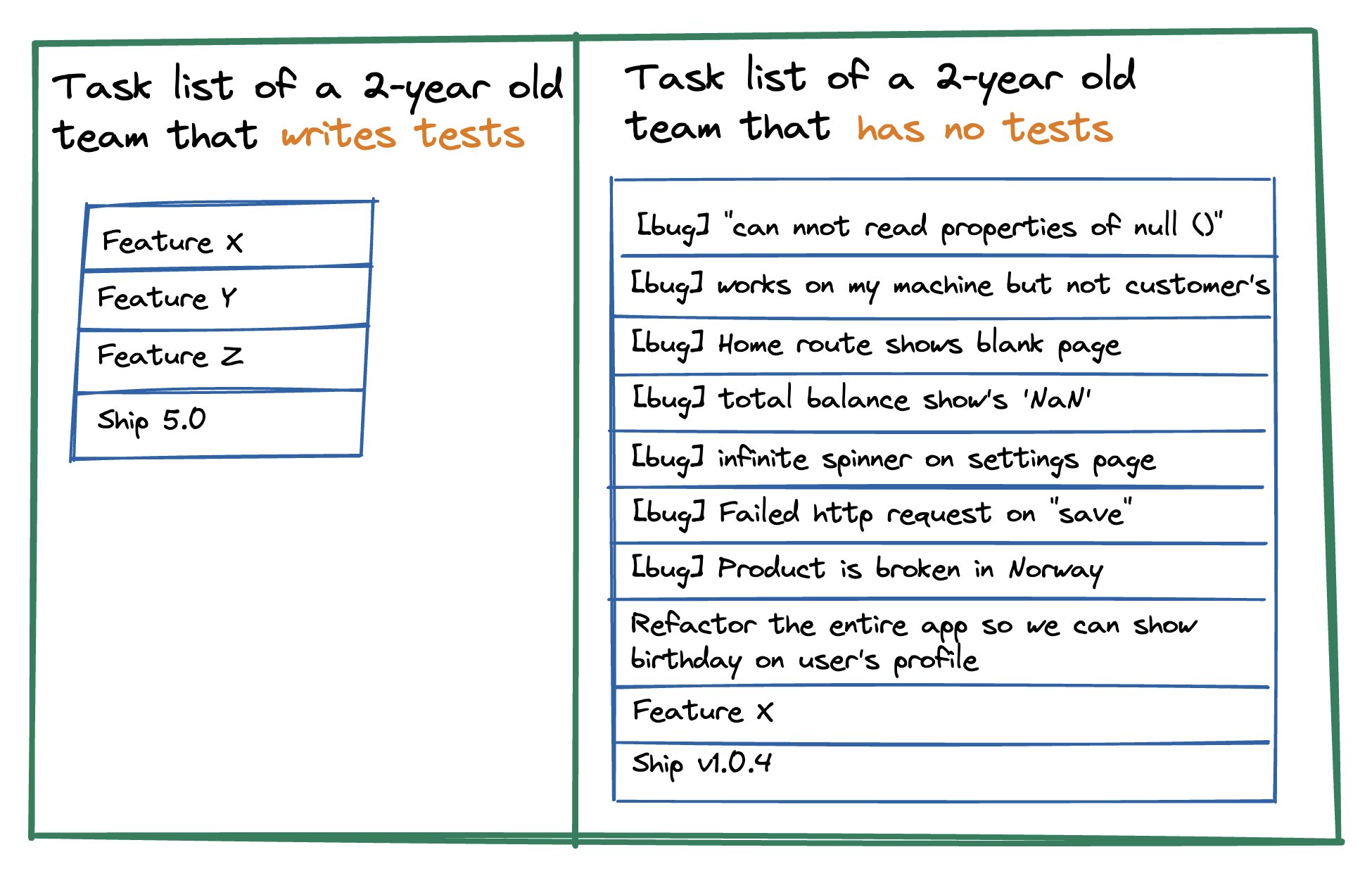
I often feel i get caught up in solving things reactively, on-the-go, as quickly as possible. Often times under budget constraints from customers, and without managing to fairly price based on the time it takes to actually do the job well. Not just solving the current problem, but making considerations as to if the problem is worth solving at all, or rather if the root problem actually lies elsewhere.
More often than not the more resilient problem solving, is looking deeper at the problem, and removing layers of complexity, rather than adding more. But at the same time, the quickest way to find a solution is to patch work.
Aaron Abrams shared the following image that well summarized the issue:
Image showing task list with or without writing tests
As much as I strive towards the "doing it right once" direction, it cannot be done without the understanding from customers of its actual benefits.
But it has to start somewhere. The least I can do it share my thoughts about it.
This year I have decided to make the leap, and transition from my trusty Gmail account. I have long considered to, but the task felt so huge that I always pushed it aside.
I was a user of gmail since the early beta-stages. For a long time I was even a huge proponent of it. Suggested it to friends and family as a great alternative to hotmail, gmx, outlook and the likes. At the time it was a big plus for me that it was «free», and I had absolutely no interest in paying money when a free option was available.
Fast forward 20 years, and I still have that «free» gmail account. Except this time I know the greater picture of that free-business model. I know that I’ve basically given insight to my whole digital mailbox the last 2 decades, and it starts to bother me looking back.
I no longer look at free products as being actually free, but consider what lies within the free-model. Maybe its just me getting older too, but I can’t help but feel much more inclined to use products that are fairly priced in an understandable way – rather than free products that I either don’t understand how makes money, or don’t like how makes money.
Which is why I’m now here. This is my new home for my emails. Hey perfectly answers all my wishes for what an email service should be.
It will take time. I know that. I will still depend on gmail for a while longer. But the transition has started.