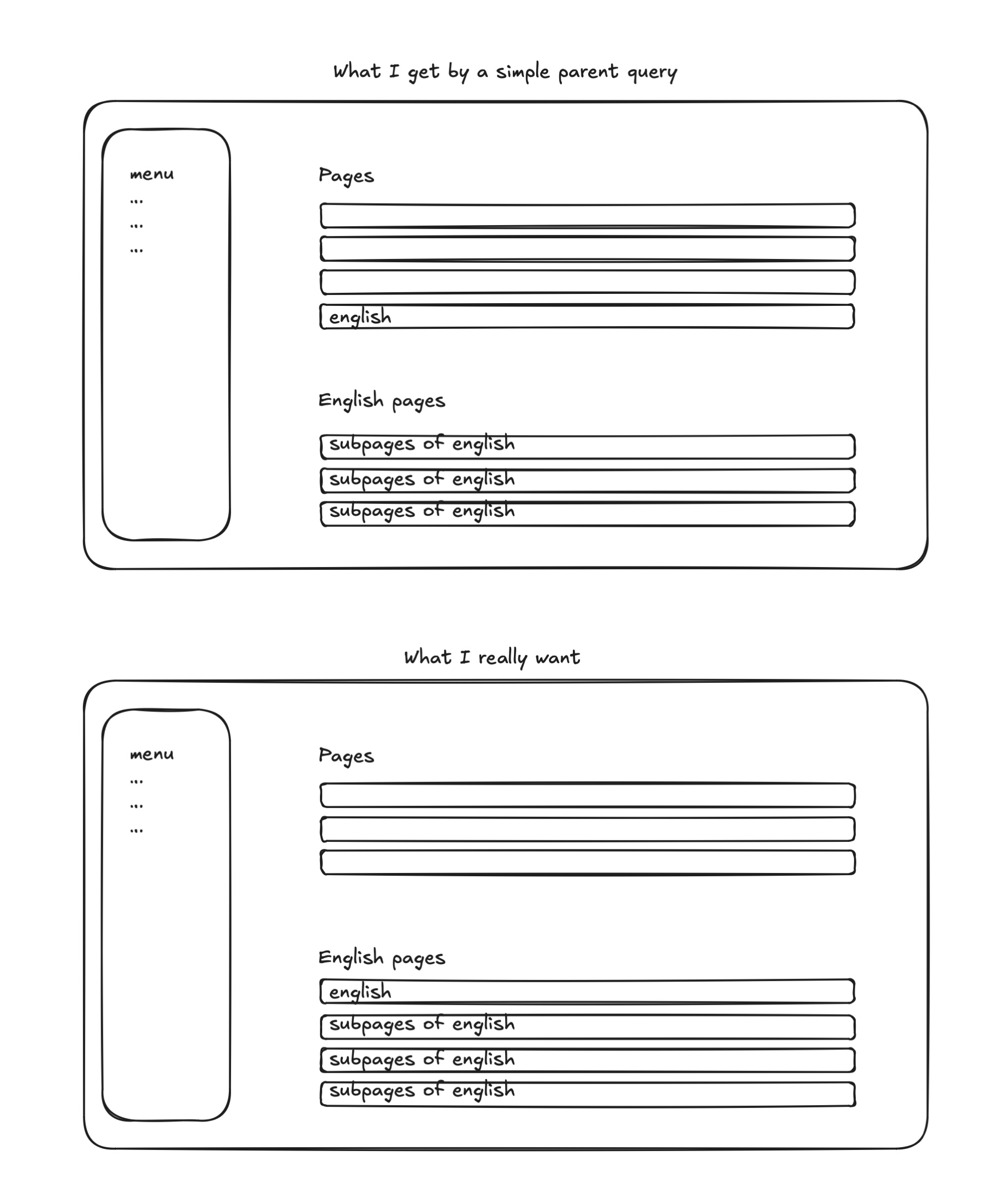
Sometimes I want to display all sub-pages of a certain page together with the parent page in the panel.
An example of this is a basic multi-language setup like 3-5 pages in a native language, plus a couple of english pages also. Some might prefer enabling multilanguage etc. for this, but to me a basic content structure is an easier solution on small pages.
Anyways, this is how I do it with collections.
The easy "out-of-the-box" solution that works well if its a blog, projects, products etc. (a collection or grouping of items) is to just use the parent query. But this of course doesn't include the actual parent which I want in this particular case.
Out of the box I haven't found a simple way to do this, so I use collections for it.
In a collection one can merge multiple queries together, which later can be used in the pages section as a query.
What the heck is up with all the flipping you might ask.
Because in this example, the front page is a single, and the child pages are a collection, I can only add the former to the latter, and not the other way around.
The result is then that the home page ends up at the bottom – which I don't want.
So I first invert the collection, then add the front page to the bottom, then invert the whole thing back. That gives me what I want.
Surely there are more elegant solutions to this, but this is my solution, and it does the job ✌️
Following up on my post from last week, I decided to install Linux on an old 2016 MacBook that was just gathering dust. I installed Ubuntu 24.04 and went through the Omakub installer.
This post will just be a short note-to-self on how to rsync stuff from MacOS to Linux and the other way around locally on my two machines.
Linux to Mac:
Currently on macOS Sonoma (14.6.1)
I needed to go to System settings -> General -> Sharing -> Remote login and turn this on.
To find the local hostname, click on the info-icon next to the "Remote login" lightswitch, and you'll see the host name and how to connect via SSH.
Mac to Linux (Ubuntu 24.04):
You can find your host name by going to Settings -> System -> Secure Shell.
Here one can also flip the light switch to turn it on, but somehow that kept flipping back off after closing settings for me each time.
To actually be able to connect to the Linux from my mac, I needed to install opens-client and openssh-server on it. Running the following did the trick:
At first I started to really consider Linux. Partly because small things annoy me in macOS. Things like not being able to remove animations when switching spaces. But also because I feel stuck in my ways. I've been using Macs for so long that I've become blind to other options out there.
But then my objective voice of reason kicked in, and I didn't see enough compelling reasons to make such a drastic change. But I did want to find out what particularly inspired me with the Omakub project, and take on some of its aspects.
Lazyvim
Sometimes it's hard to pinpoint why something hits a nerve at a given point in time. Vim has been around for ages, and I've always kind of hated it. ssh-ing into a server and trying to do basic stuff like copying one line and pasting it a different spot was a frustration. What's yanking?
Fast forward to 2024, I now see its appeal.
What before just felt foreign, now feels foreign and intriguing.
It appeals to my minimalistic approach to life.
Having less dependencies.
Less computer resources to use.
And LazyVim just made Vim more approachable.
Also, just staying in the terminal feels really nice!
David vs. Goliath
The other aspect that appealed to me from Omakub, was the "us agains the mega corporations" mindset. Whether it's Microsoft, Apple, Google or Amazon.
I keep feeling this urge. An urge to move towards more open standards.
I have a Kindle, but my next e-reader probably won't be from Amazon.
I have an iPhone, but I'm not sure the next phone will be from Apple.
I should be more flexible. Not just settle for what Apple decides to launch.
Sure, these are all potential frustrating changes in the short term. But being more vendor agnostic surely is better in the long-term.
In todays note to self, its just a basic reminder of how to check if a user is logged in or not.
Mainly because I've looked for this at least twice, and got stuck with old forum answers with pre-Kirby v.3 syntax that didn't work.
As with most stuff in Kirby it's very easy once you know how. But sometimes you (me) still get stuck in docs and google searching for small things like this.
if ($kirby->user()) {
/* Do some cool stuff*/
}
Or if you maybe just want to hide the whole page behind a login:
/* in top of the master template file */
<?php if (!$kirby->user()) redirect('/panel') ?>
I use this to be able to make new sections of a page without it being open to the public. For example when I want the client or my coworker to just quickly have a look at it before releasing it.
I also use the redirect solution for working on a WIP-project until it's ready to go live.
There's a term in running called a "kick", which refers to the ability to sprint at the end of an endurance-oriented race.
Often it leads to anger amongst other competitors, who felt it unfair that they had to lead in front the whole race only to be overtaken the last meters.
Yesterday I was watching the final of 1500m running in the Paris Olympic, and Jakob Ingebrigtsen led the race about 1400m out of the 1500m, but ended up forth. Some might say that it was a bad strategic choice, but I believe he knew there were too many other runners in the field with a better kick than himself, so he had to rely on the overall pace of the race. He needed to get rid of the kickers earlier in the race by pushing hard all the way through, to avoid the end sprint.
I'm by no means a professional runner, but from my understanding the value of having a good kick is underestimated.
The Sanity Content Lake is where your content is stored and accessed. It runs in the cloud and is fully managed by us.
What I read: your data is ours, and we control it.
You want to keep the data in your own server you say? Not possible. Do people want it? Yes they do.
Why isn't it possible? Would only be guessing from my side, but data is quite valuable isn't it? And Sanity has investors and surely ambitional growth plans. I can only imagine data ownership being an important factor.
Call me old fashioned, but I'd rather choose where to store my data myself, however fancy and convenient the "lake" is.
Sometimes the database keeps growing and you want to figure out which table(s) are causing the issue. It happens sometimes for me on Craft CMS projects.
I then find it useful to be able to isolate the largest table(s) within the database to see where the issue is at.
I've found the simplest solution being to run the following query:
SELECT tablename AS "Tables", round(((datalength + indexlength) / 1024 / 1024), 2) "Size in MB" FROM informationschema.TABLES WHERE tableschema = "yourdbname" ORDER BY (datalength + index_length) DESC;
I guess a natural follow up question is: Why did you start in the first place?
My thoughts on it:
"Writing to learn": I believe that writing is a great way to learn.
It sorts floating thoughts somewhere. Sure, could be private notes. Could be a physical notepads. Could be voicenotes. But since I make web pages for a living, a simple blog seems like a decent fit.
Practice. Writing is a core skill that never goes out of date, and always will be relevant. And writing a blog practices that writing-muscle.
Learning to let go. Clicking that "publish" button might not mean much. After all, I can probably count on one hand the readers of this post. Still, it feels like a massive hurdle. And because "caring less what others think" is a personal goal of mine, writing and pressing publish aligns well with that. The uncomfort is just proof that I still care too much.
As Steve Jobs said: "You can't connect the dots looking forward; you can only connect them looking backwards. So you have to trust that the dots will somehow connect in your future.". Having some dots written down and timestamped will make it easier for future-you to connect them.
I know, not a great list, but enough to keep me at it for now.
"Writing is easy. You only need to stare at a blank piece of paper until drops of blood form on your forehead"
– Gene Fowler
In the same way the average weight of web pages has steadily increased over the years, we are (arguably) not building much better sites than we did 10 years ago.
Of course I love progress, and I also understand the issue of backwards capability. Still, think of something like jQuery, with its massive user base, still managing to reduce the size of jQuery 4 compared to 3.7.1.
Or think of Snow Leopard, one of my favorite ever OS updates, managing to make a point out of simply "cleaning up" and having "0 new features". Still the release was full of refinements and little touches. And an upgrade from Leopard to Snow Leopard actually freed up about 7GB of hard disk space. And this was back in 2009! Thats my favorite type of release.